Free · macOS, Windows and Linux
Say it aloud
before you forget it.
A thought pops up, and it is gone before you open a notes app. With Daily Log you hold a shortcut in any app, say it, and let go. It is written down on your computer: work you finished, groceries to buy, ideas, anything.
Not just for work
If it crosses your mind, say it
Good thoughts arrive at bad times: halfway through an email, in the middle of a build, while you cook. Say it out loud the moment it arrives and get back to what you were doing.
Work you finished
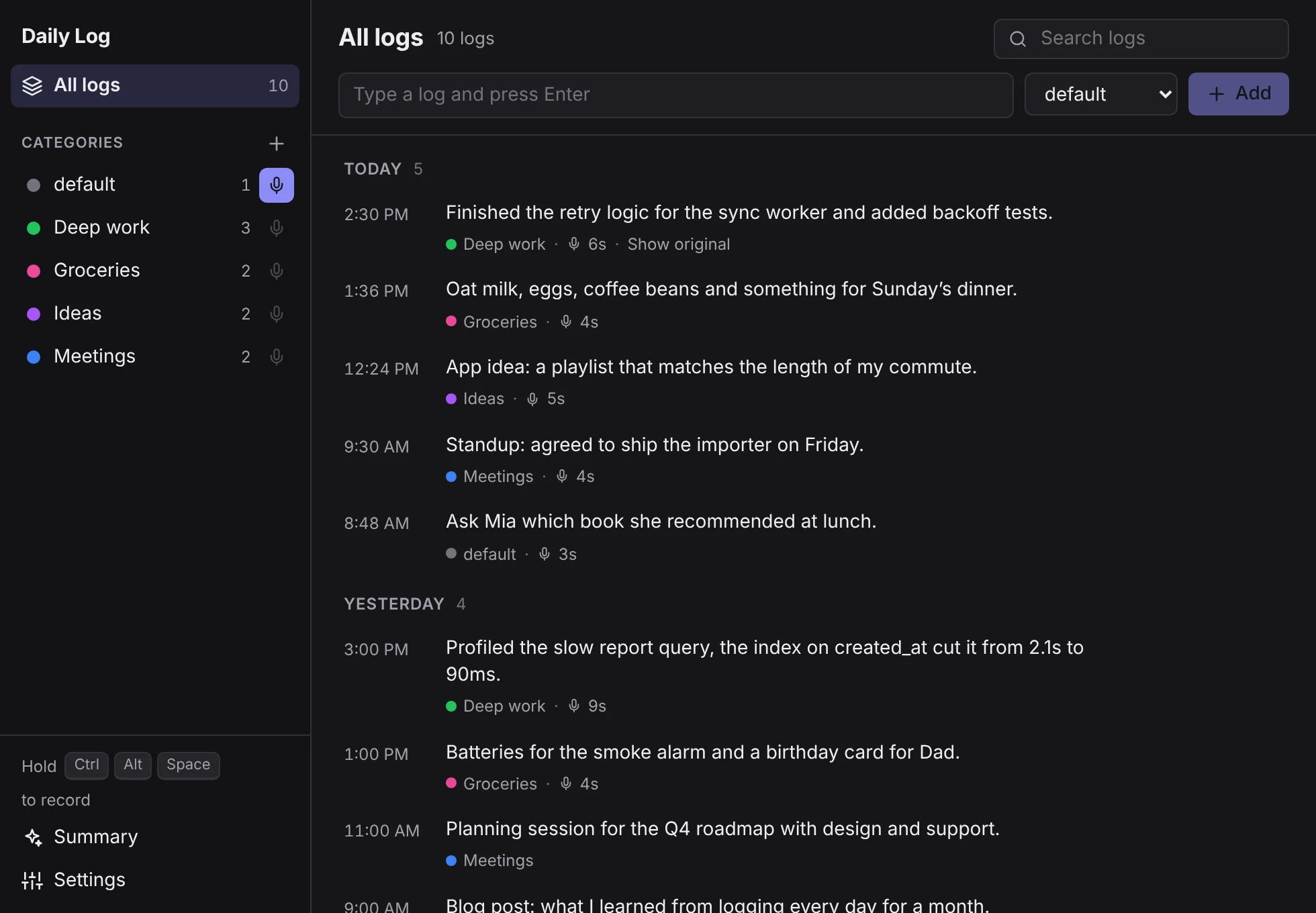
Finished the retry logic for the sync worker and added backoff tests.
Deep work ·
Things to buy
Oat milk, eggs, coffee beans and something for Sunday’s dinner.
Groceries ·
Ideas in passing
App idea: a playlist that matches the length of my commute.
Ideas ·
Random thoughts
Ask Mia which book she recommended at lunch.
default ·
Turn on “First word as category” and start with a name, like “Groceries, oat milk and eggs”, to file the log there.
Simple by default
Three steps. No window to open.
Daily Log waits in the tray until a thought arrives. Saving it takes as long as saying it.
- 01
Hold the shortcut
From any app. Daily Log never steals focus, so you stay where you were.
- 02
Say it
A small pill shows it is listening. Up to five minutes per log.
- 03
Let go
It is transcribed on your computer and saved with the time and category.
Features
Everything a voice log needs. Nothing it doesn’t.
For catching a thought the moment it arrives, without opening an app or picking up a pen.
Private by design
Speech is transcribed by whisper.cpp on your machine. Your audio never leaves it.
Your own categories
Pick where voice logs go from the sidebar or the tray. Drag a log onto a category to move it.
Organise by voice
Optionally start with a category name, like “Groceries, oat milk”, to file it there, or say “Add category” to create one.
Edit anything
Fix a log’s text, category or time, or type one by hand when you cannot talk out loud.
Lives in your tray
Always one click away in the menu bar or system tray, out of the way the rest of the time.
Your data, on disk
Logs are kept in SQLite in your user folder. API keys go in the system keychain.
AI when you want it
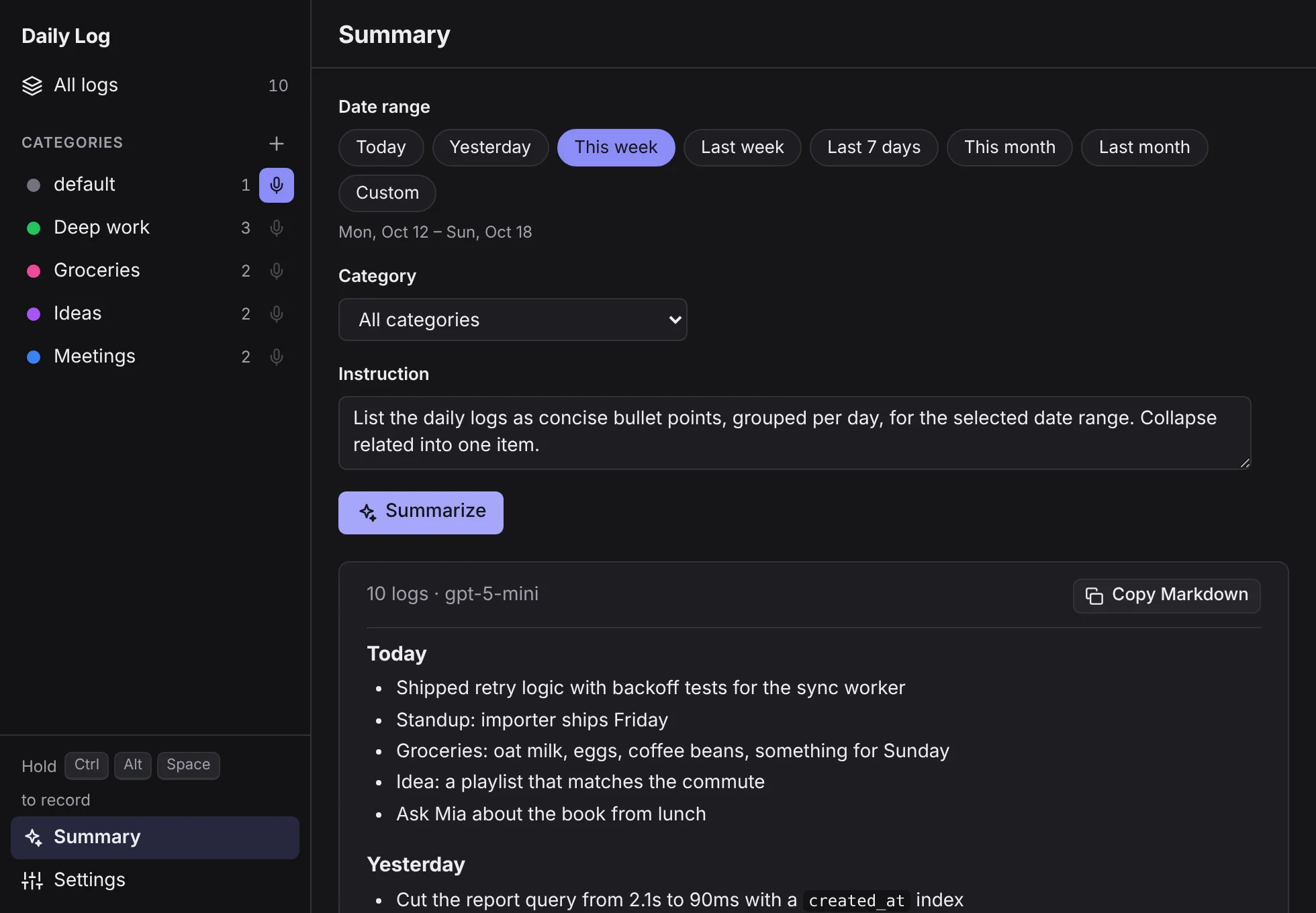
From scattered notes to a ready-made summary
Bring any model you like. Everything else in Daily Log works without one.
Your standup, weekly report or journal, written for you.
Pick a range and a category, press Summarize, and get clean Markdown grouped by day. Change the instruction to get exactly the format you need, then copy it anywhere.
- Today
- This week
- Last 7 days
- This month
- Custom
Works with
- OpenAI
- Anthropic
- OpenRouter
- Ollama
- LM Studio
- and any OpenAI-compatible API
Talk naturally. Read it back tidy.
“Um”, “uh” and repeated words are dropped on your device, no AI needed. Turn on AI enhancement to fix grammar and punctuation in the background. The original is always kept.
Saved log
Finished the retry logic for the sync worker and added backoff tests.
Performance and privacy
Fast because it never leaves your computer
Your voice is turned into text right where you said it.
- of audio sent anywhere
- 0 bytes
of audio sent anywhere
- native core, built with Tauri 2
- Rust
native core, built with Tauri 2
- of Whisper model, from 78 MB
- 3 sizes
of Whisper model, from 78 MB
- or auto-detect, with multilingual models
- 21 languages
or auto-detect, with multilingual models
-
Native, not a browser tab
A Rust core with the system webview, not a bundled browser. It waits quietly in the tray.
-
Transcribed on your machine
whisper.cpp runs locally. No upload, no queue, no waiting on a server somewhere else.
-
Works offline
Once the speech model is downloaded, recording and transcription need no connection.
- RustTauri 2whisper.cppSQLiteSvelte 5
Choose your speed
Whisper models, in English-only or multilingual versions.
- Tiny 78 MB
Fastest. Good for clear speech and short notes.
- Base Default 148 MB
Balanced speed and accuracy. Recommended.
- Small 488 MB
Most accurate. Slower, especially without a GPU.
A closer look
Designed to stay out of your way
Work, groceries and ideas side by side, grouped by day, each in its own category.
Free to download. Free forever.
No account, no subscription, no tracking.
Installers are on their way. Check back soon.
macOS
macOS 11 or later
Coming soon for macOS- Apple Silicon · Intel
Windows
Windows 10 and 11
Coming soon for Windows- .exe · .msi
Linux
X11 session
Coming soon for Linux- .AppImage · .deb · .rpm
Installers are not code signed yet, so your system may warn you the first time. On first start Daily Log downloads its speech model, about 150 MB.
Questions
Good to know
Is it really free?
Yes. Daily Log is free to download and use. There is no account and no subscription.
Does my voice leave my computer?
No. Transcription runs locally with Whisper. Only if you turn on AI summaries or AI enhancement are the log texts being summarised or enhanced sent to the provider you choose, and that can be a local model through Ollama or LM Studio.
Do I need an AI subscription?
No. Recording, transcription, categories, editing and filler-word removal all work without AI. Summaries and AI enhancement are optional extras.
Why does my system warn me when I install it?
The installers are not code signed yet. On macOS, right-click the app and choose Open the first time. On Windows, choose More info, then Run anyway.
Does it work on Linux?
Yes, as an AppImage, .deb or .rpm. Global shortcuts need an X11 session, because most Wayland desktops do not let apps register them.